
LangGraph from Scratch: A Beginner Tutorial for Python Developers
LangGraph from Scratch: A Beginner Tutorial for Python Developers
So, you’ve played with LangChain. You’ve chained a prompt to an LLM, maybe even added a memory buffer. It felt like magic.
But then you tried to build something real.
Maybe you wanted a chatbot that could ask clarifying questions before searching the web. Or an agent that loops until it fixes its own syntax error. Suddenly, your linear chain started looking like a bowl of spaghetti, and you found yourself writing if-else statements that would make a senior engineer cry.
Enter LangGraph.
What Is LangGraph?
LangGraph is a library for building stateful, multi-actor applications with LLMs. In plain English? It’s a tool that helps you build AI agents that can loop, remember things, and make decisions without collapsing into chaos. It treats your application flow as a graph (nodes and edges) rather than a straight line.
What you’ll learn: The high-level definition of LangGraph and where it fits in the Python AI ecosystem.
Why this section matters: Before we write code, you need to understand what tool you are picking up. LangGraph is not just "LangChain 2.0"; it's a fundamental shift to thinking in state machines.
Why LangGraph Exists (The Problem It Solves)
If you’ve ever tried to build an autonomous agent with a simple Chain, you’ve hit these walls:
- Loops are hard: Chains are Directed Acyclic Graphs (DAGs). They go start -> finish. But real agents need to retry and loop (e.g., "Did my code run? No? Fix it and try again").
- Shared State: Passing context between 10 different unrelated steps is a nightmare of variable juggling.
- Control Flow: Sometimes you want to go from A to B, but sometimes from A to C depending on what the user said.
LangGraph solves this by letting you define a cyclical graph where the "Brain" (LLM) controls the flow.
What you’ll learn: The architectural pain points of linear chains and how graph-based orchestration fixes them.
Why this section matters: Understanding the "why" helps you realize that LangGraph isn't adding complexity; it's actually managing the complexity you inevitably encounter in agent systems.
Core Concepts: Graphs, Nodes, Edges, State
Let's break the mental model down into four lego blocks.
- State: The shared memory of your application. Think of it like a Python dictionary that gets passed around to everyone.
- Nodes: The workers. A node is just a Python function. It receives the
State, does some work (like calling an LLM), and returns an update to theState. - Edges: The traffic lights. They determine where to go next.
- Graph: The map that holds it all together.
What you’ll learn: The vocabulary of LangGraph.
Why this section matters: These four terms are the absolute foundation. If you understand "State" and "Nodes," you understand 90% of LangGraph.
LangGraph Mental Model (State Machine for LLM Apps)
Stop thinking about "Chains." Start thinking about State Machines.
A state machine is a system that can be in one valid state at a time. It moves from state to state based on inputs.
- State 1: Waiting for user input.
- State 2: Thinking (LLM processing).
- State 3: Acting (Tool calling).
- State 4: We’re done.
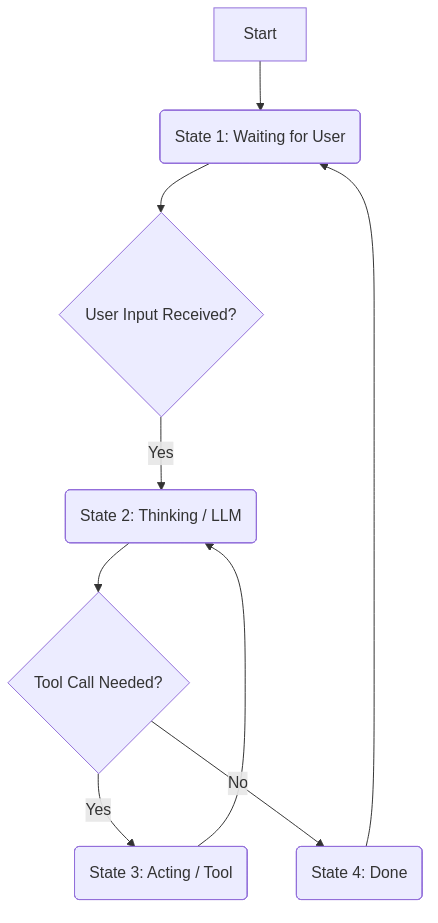
LangGraph gives you observability and determinism. You can pause the graph, inspect the state, edit it, and resume. Try doing that with a messy recursive Python function!
What you’ll learn: How to shift your mindset from procedural code to state-driven architecture.
Why this section matters: This mental model is the secret sauce for building production-ready agents that you can actually debug.
Installation and Minimal “Hello World” Example
Enough talk. Let's write some Python.
First, install the goods:
pip install langgraph langchain langchain-openai
Now, the simplest possible graph:
import os
from typing import TypedDict
from langgraph.graph import StateGraph, END

# 1. Define State
class MyState(TypedDict):
    message: str

# 2. Define Nodes (The Workers)
def shout_node(state: MyState):
    print("--- SHOUTING ---")
    return {"message": state['message'].upper()}

def whisper_node(state: MyState):
    print("--- whispering ---")
    return {"message": "Final: " + state['message'].lower()}

# 3. Build the Graph
builder = StateGraph(MyState)
builder.add_node("shouter", shout_node)
builder.add_node("whisperer", whisper_node)

# 4. Define Edges (The Logic)
builder.set_entry_point("shouter")
builder.add_edge("shouter", "whisperer")
builder.add_edge("whisperer", END)

# 5. Compile and Run
graph = builder.compile()

result = graph.invoke({"message": "Hello LangGraph"})
print(result)
What just happened?
- We defined a
State(just a dict with a message). shout_nodetook the message and uppercased it.- The graph moved to
whispererautomatically because ofadd_edge. whispereradded a prefix and lowercased it.- Usually, we hit
END, so the graph stopped.
What you’ll learn: How to create a runnable LangGraph application in < 30 lines of code.
Why this section matters: It demystifies the syntax. It proves that a "Graph" is just a few Python functions strung together.
Conditional Routing Example (Beginner-Friendly)
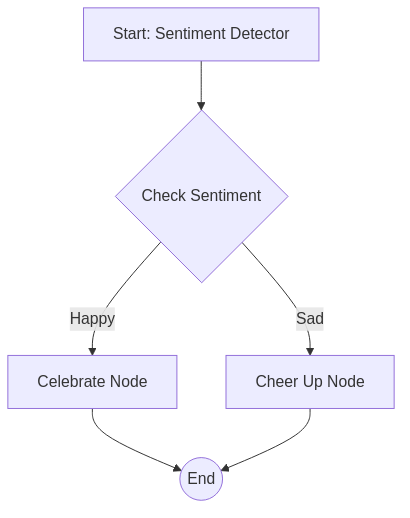
Linear graphs are boring. Let’s add a fork in the road.
Imagine a router that checks if the user is happy or sad.
from langgraph.graph import StateGraph, END
import random

# State
class MoodState(TypedDict):
    sentiment: str

# Nodes
def sentiment_detector(state):
    # Simulate an LLM detecting sentiment
    moods = ["happy", "sad"]
    detected = random.choice(moods)
    print(f"Detected sentiment: {detected}")
    return {"sentiment": detected}

def cheer_up_node(state):
    return {"final_response": "Here is a cookie! 🍪"}

def celebrate_node(state):
    return {"final_response": "High five! 🙌"}

# Router Logic
def route_sentiment(state):
    if state["sentiment"] == "happy":
        return "celebrate"
    else:
        return "cheer_up"

# Build Graph
builder = StateGraph(MoodState)
builder.add_node("detector", sentiment_detector)
builder.add_node("cheer_up", cheer_up_node)
builder.add_node("celebrate", celebrate_node)

builder.set_entry_point("detector")

# CONDITIONAL EDGE
builder.add_conditional_edges(
    "detector",        # Start node
    route_sentiment,   # Decision function
    {                  # Map output to next node
        "cheer_up": "cheer_up",
        "celebrate": "celebrate"
    }
)
builder.add_edge("cheer_up", END)
builder.add_edge("celebrate", END)

app = builder.compile()
print(app.invoke({"sentiment": ""}))
What you’ll learn: How to use
add_conditional_edgesto make dynamic decisions.Why this section matters: This is the heart of "Agency." Agents aren't useful because they follow instructions; they are useful because they decide what to do next.
Tool Calling in LangGraph (Real Agent Behavior)
An agent without tools is just a philosopher. An agent with tools is a worker.
In LangGraph, tool calling is just a loop:
- LLM decides to call a tool.
- Graph routes to the "Tool Node."
- Tool Node executes Python function.
- Graph routes back to LLM with the result.
This cycle tells the LLM: "Hey, you wanted to check the weather? Here is the result: 'Raining'. Now what?"
What you’ll learn: How tools fit into the graph architecture as just another node interaction.
Why this section matters: Real-world automation relies on connecting LLMs to APIs, databases, and calculators.
Memory and Persistence Concepts
Memory in LangGraph isn't just "remembering the chat history." It's about Checkpointing.
LangGraph allows you to save the entire state of the graph at every step. This means if your server crashes in step 3 of 10, you can resume exactly from step 3. It also allows "Human-in-the-loop"—the graph can pause, wait for a human to approve a draft, and then continue.
What you’ll learn: The difference between context (short-term) and persistence (long-term reliability).
Why this section matters: For building robust apps, you need to handle failures and long-running processes. Persistence is key.
Real Use Case: “Form Filling Agent” Using LangGraph
Let’s build something useful. A "Form Filler" that annoys you until you give it all the info.
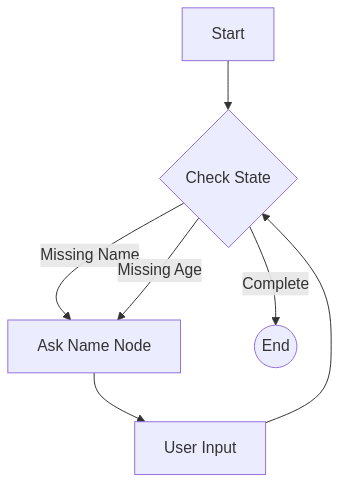
The Scenario: We need a user's Name and Age. The Logic:
- Check State. Do we have Name? No? -> Ask for Name.
- Check State. Do we have Age? No? -> Ask for Age.
- Have both? -> Finish.
The Graph:
Node: Reviewer(checks what is missing)Node: Asker(generates the question)
In LangGraph, this is a cycle.
Reviewer -> Asker -> User Input -> Reviewer -> ...
If the user says "I am John" (but forgets age), the graph loops back. Logic: "Okay, I have Name ('John'), but I still need Age." -> "Hi John, how old are you?"
from langgraph.graph import StateGraph, END

class UserState(TypedDict):
    name: str | None
    age: str | None
    next_question: str | None

def reviewer_node(state):
    # Check what is missing
    if not state.get("name"):
        return {"next_question": "What is your name?"}
    if not state.get("age"):
        return {"next_question": "How old are you?"}
    return {"next_question": None} # All Done

def asker_node(state):
    # In real life, this would send the question to the UI
    question = state["next_question"]
    print(f"BOT: {question}")

    # Simulating user input for the demo
    # You would normally get this from an API input
    user_input = input("YOU: ")

    updates = {}
    if "name" in question.lower():
        updates["name"] = user_input
    if "old" in question.lower():
        updates["age"] = user_input

    return updates

# Logic to decide where to go
def route_checker(state):
    if state.get("next_question") is None:
        return "done"
    return "ask"

builder = StateGraph(UserState)
builder.add_node("reviewer", reviewer_node)
builder.add_node("asker", asker_node)

builder.set_entry_point("reviewer")

builder.add_conditional_edges(
    "reviewer",
    route_checker,
    {"done": END, "ask": "asker"}
)
builder.add_edge("asker", "reviewer") # Loop back!

app = builder.compile()

# Run it manually (simulated)
# app.invoke({"name": None, "age": None})
What you’ll learn: How to design a cyclic graph for data collection.
Why this section matters: This pattern (validation loops) is incredibly common in enterprise applications, from customer support to intake forms.
LangGraph vs LangChain (When to Choose Which)
| Feature | LangChain (Chains) | LangGraph |
|---|---|---|
| Structure | Linear (A -> B -> C) | Cyclic / Network |
| Control | Hard-coded flow | LLM-driven / State-machine |
| Complexity | Low | Medium/High |
| Use Case | RAG, simple chatbots | Autonomous Agents, complex flows |
Simple rule: If you need a loop, use LangGraph. If you just need to summarize a PDF, Chain is fine.
What you’ll learn: How to pick the right tool for the job.
Why this section matters: Don't over-engineer. You don't need a graph to make a "Hello World" endpoint.
Why I Choose LangGraph (Opinion + Rationale)
Personally? I choose LangGraph because I like control. When I use higher-level frameworks (like CrewAI or AutoGen), sometimes it feels like magic—until it breaks. Then I can't fix it. LangGraph is lower-level. It forces you to define your edges explicitly. It’s verbose, yes, but when my agent starts hallucinating, I know exactly which node caused it. It fits perfectly into the Python ecosystem—it’s just functions and dicts!
What you’ll learn: The trade-offs of using a lower-level orchestration library.
Why this section matters: Understanding the "developer experience" helps you decide if this library aligns with your coding style.
Future of LangGraph
We are moving toward Multi-Agent Orchestration. Imagine a "Research Graph" dealing with a "Coding Graph." LangGraph is setting the standard for these patterns. The future is hierarchical: a Manager Node delegating to Worker Sub-Graphs.
What you’ll learn: Where the technology is heading.
Why this section matters: You want to learn skills that will be relevant next year, not just today.
Best Practices and Common Pitfalls
- Keep State Minimal: Don't stuff 10MB of PDF text into your state if you don't have to.
- Explicit Routing: Don't rely on the LLM to "magically" know where to go next. Use structured output to force it to choose a valid path.
- Visualise It: LangGraph has a visualizer. Use it. If the graph looks like a spaghetti monster, your code is probably a spaghetti monster.
What you’ll learn: Tips to save you hours of debugging.
Why this section matters: Learning from others' mistakes is faster than making them all yourself.
Conclusion + Next Steps
You made it! You now know the difference between a Chain and a Graph.
You have the power to build agents that loop, retry, and reason. Your mission, should you choose to accept it:
- Run the "Hello World" code above.
- Try to add a third node to it.
- Build a simple "Guess the Number" game where the generic agent plays against a verifier node.
Go forth and graph! The world of autonomous agents is waiting.